Get the 411 on Spyware
Internet Security 2010 Removal Guide
Do not fall for the cleverly marketed and sly lies of Internet Security 2010. This rogue security application was not designed with your interests at heart. In fact, Internet Security 2010 was designed to act solely as a vehicle with which unscrupulous developers of rogueware is able to rip unsuspecting users off. Internet Security 2010 will of course attempt to convince its victims of its seeming legitimacy, but the truth is a completely different matter. Despite its valiant efforts to convince its victims otherwise, Internet Security 2010 certainly does not have the ability to detect and remove any type of threat from the system.
Internet Security 2010 enters the system surreptitiously through the use of browser hijackers, and will remain hidden until such time that it is able to execute its attack against the system. This first clue the user will have as to the presence of Internet Security 2010 on the PC will come in the form of a fake alert which will be displayed even before the user sees his Desktop:
Security Warning!
Worm.Win32.NetSky detected on your machine.
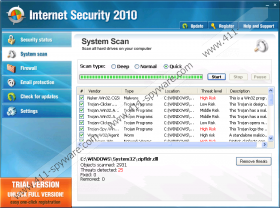
Once the user logs on to Windows, he will also be presented with a fake scan which will inevitably yield bogus results. These fake results are only meant to further scare the user into thinking his PC is under attack, and that he should pay for Internet Security 2010. Shortly after this fake scan, the user will find himself with numerous annoying pop up messages informing him that his system is under attack.
As a further attack against the PC, Internet Security 2010 will prevent the user from launching any type of application on the infected PC. Each time the user attempts to launch an application, he will be presented with the following error message:
Application cannot be executed. The file is infected. Please activate your antivirus software.
The same error will occur each time the user attempts to launch a media player, stating the following:
Windows can`t play the following media formats: AVI;WMV;AVS;FLV;MKV;MOV;3GP;MP4;MPG;MPEG;MP3;AAC;WAV;WMA;CDA;FLAC;M4A;MID. Update your video and sound codec to resolve this issue.
Other symptoms associated with the Internet Security 2010 scam include increased erratic system performance, as well as extremely poor system performance. All of these tactics are employed as part of Internet Security 2010’s attack against the system, and is only done so in an effort to force the user to part with his money.
Restore your PC’s security and remove Internet Security 2010 with the help of a genuine security tool. This is the only way you will be able to regain control of your PC, and restore the system’s good functioning.
Internet Security 2010 Screenshots: